%201.svg)

7 Signs You're Not Ready for an AI Video Interview (And How to Fix Them)



AI interviews score things human interviewers miss. But is your current interview style helping you stand out, or are you unknowingly hurting your score?
In a traditional interview, you rely on your knowledge of the subject and your ability to read the room. You build rapport and adjust your delivery based on the interviewer’s reactions. But in an automated video interview, the rules of engagement are rewritten. There is no recruiter to nod encouragingly while you find your thoughts. There is only a lens, a timer, and an algorithm measuring thousands of data points per minute. For many candidates, this shift is jarring. You might be the most qualified person for the job, but if you trigger specific algorithmic red flags, your application could be rejected before a human ever sees it.
The good news? These red flags are fixable. Here are the 7 clear signs that you are not yet ready for the camera, and the AI video interview tips you need to turn your performance around.
Sign #1: You Are Using Too Many Filler Words
We all do it. In casual conversation, words like "um," "uh," "like," and "you know" act as glue while our brains construct the next sentence. To a human ear, they are often filtered out as background noise.
To an AI, however, they are data. A high frequency of filler words can impact your Communication Skills/Confidence score. The algorithm may interpret excessive hesitation not just as a speech habit, but as a lack of certainty in your own experience. If you are saying "um" every three words, the machine calculates that you are struggling to retrieve information.
How to Fix It: The solution is not to silence yourself, but to embrace the pause. In video interview practice, train yourself to stop speaking when you need to think. A silent pause projects confidence and thoughtfulness. A vocalized pause ("ummmm") projects anxiety. Record yourself answering a standard question and count the fillers. Your goal is to reduce them by 50% in your next attempt.
Sign #2: Your Eye Contact Is Inconsistent
It feels unnatural to stare at a black dot on your laptop bezel. Our instinct is to look at ourselves on the screen or to look down at our notes.
In a virtual interview practice scenario, looking away frequently can be flagged as "low engagement" or even dishonesty. Some advanced proctoring AI might even flag erratic eye movement as a sign that you are reading from a script or looking up answers on a different monitor.
How to Fix It: Treat the camera lens as the interviewer's eye. Place a small sticky note with a smiley face right next to the camera to draw your gaze. During your preparatory sessions, practice delivering your entire answer while maintaining visual lock with that sticky note. It feels intense at first, but on the other side of the recording, it looks like deep, focused engagement.
Sign #3: You Ramble Without Structure
In a human conversation, you can wander a bit. A recruiter might interrupt you to guide you back to the point. An AI will not save you. It will simply let you run out the clock.
If your answer lacks a clear beginning, middle, and end, the AI may struggle to categorize your competencies. It searches for specific markers of a story (Situation, Task, Action, Result). If you ramble, your score drops because the system cannot identify the "Action" you actually took.
How to Fix It: Practice using a framework (say STAR) for structuring your answer:
- Situation: Briefly set the context (10% of time).
- Task: Define the challenge (10% of time).
- Action: Detail what YOU did (60% of time).
- Result: Quantify the outcome (20% of time). Use signposting language like "The action I took was..." or "As a result..."
This will help the AI parse your answers better.
Sign #4: You Haven't Practiced Speaking Out Loud
Reading your notes is not the same as speaking them. Many candidates prepare by writing bullet points but never actually vocalize them until the interview starts.
This leads to "cognitive traffic jams." You know what you want to say, but your mouth stumbles over the phrasing because you haven't built the fluency to articulate it. You might freeze up or restart your sentences, which eats into your time limit.
How to Fix It: Use an AI mock interview platform like SpectraSeek to get "reps" in. You need to bridge the gap between your brain and your voice. Speak your answers out loud until the phrasing feels muscular and automatic. This is the core of automated video interview preparation, moving from theory to execution.
Sign #5: Your Environment Is Distracting
You might think the pile of laundry behind you doesn't matter, or that the shadow casting over your face is "moody." The AI disagrees.
Poor lighting and background noise interfere with the AI's ability to analyze your facial expressions and voice clarity. If the audio is muddy, the speech-to-text transcription (which the AI actually analyzes) will be full of errors. If the transcription is wrong, your keyword matches will be wrong, and your score will plummet.
How to Fix It: Control your variables.
- Light: Face a window or a lamp. Never have the light source behind you.
- Sound: Use a headset with a microphone rather than your laptop's built-in mic to eliminate echo.
- Background: A plain wall is better than a messy room. Eliminate visual noise so the AI focuses solely on you.
Sign #6: You Pause Too Long Before Answering
When the question appears, the clock starts. Taking 30 seconds to gather your thoughts before speaking might be acceptable in a relaxed human chat, but in a timed AI environment, it eats up valuable seconds and can be interpreted as a lack of readiness.
Long silences at the start of a recording can also mess with the pacing analysis. It signals that you do not have the information readily available.
How to Fix It: Develop "buffer phrases" to buy yourself a moment while keeping the flow going. Phrases like, "That is a great question. I encountered a similar situation when I was working at..." allow you to start speaking immediately while your brain retrieves the specific details of the story.
Sign #7: You Sound Rehearsed Instead of Authentic
This is the most common trap for prepared candidates. You find a "perfect" answer on a career blog, memorize it, and recite it word-for-word.
Modern AI platforms evaluate for Authenticity Scores. If your content is full of generic buzzwords (like "I'm a hard worker" or "I'm a perfectionist") without specific details to back them up, the AI flags you as "scripted." Employers use these tools to find unique human experiences, not candidates who can memorize a Google search result.
How to Fix It: This is where SpectraSeek is invaluable. The platform provides an Authenticity Score that specifically analyzes if you are providing unique, personal evidence or just reciting common clichés.
- Ditch the memorization. Do not write out full sentences. Memorize your key bullet points so you formulate the sentences naturally in the moment.
- Inject personal details. Don't just say, "I am a proactive problem solver." Tell the story of the time you noticed client tickets piling up and built a new triage system that reduced response times by 40%.
- Avoid the "Dictionary Definition" trap. Don't define a skill (e.g., "Leadership is about guiding people"). Instead, describe a moment where you exercised that skill.
Conclusion
If you recognize yourself in any of these signs, don't panic. These are not character flaws; they are simply performance habits that can be adjusted.
The only difference between a candidate who fails an AI interview and one who passes is data. The failing candidate guesses how they are coming across. The successful candidate knows.
By using tools like SpectraSeek, you can diagnose these issues before the real interview. You can see your Overall Candidate Fit, check your Interview Readiness, and fix your eye contact or pacing in a safe, private environment.
Stop sabotaging your score. Visit InterspectAI to turn these red flags into green lights.
TL;DR
AI video interviews shift the focus from human connection to data-driven performance, meaning even the most qualified candidates can face rejection if their non-verbal cues trigger algorithmic red flags. Success in this new format requires more than just subject knowledge; it demands that you diagnose and adjust your performance habits using tools like SpectraSeek to ensure your performance is just as polished as your credentials
FAQs
Can an AI really tell if I am making eye contact?
Yes. Some modern video interview technologies use facial tracking to monitor gaze direction. While it doesn't need to be 100% perfect, consistent engagement with the camera lens is impactful.
Is it bad to look at my notes during an AI interview?
It is okay to glance, but do not read. If your eyes are tracking left-to-right constantly, the AI (and human reviewers) will know you are reading a script. This can impact your score.
How do I fix my "filler words" if I don't realize I'm saying them?
This is why recording yourself is essential. You often cannot hear your own "ums" in real-time. An AI video interview tips tool like SpectraSeek will bring it to your notice.
What is the best lighting for an AI interview?
Soft, front-facing light is best. Avoid harsh overhead lights that create raccoon shadows under your eyes, and never sit with a bright window behind you (backlighting), as it turns you into a silhouette that the AI cannot analyze.
You might also like

Why are more and more companies investing in conversational intelligence? The benefits extend beyond having nicer conversations – they directly impact business performance and the bottom line.
🔖 What is Conversational Intelligence (CI)? Everything You Need to Know
Here are some key benefits enterprises see when implementing conversational intelligence effectively.
Deeper customer understanding and engagement
Conversational intelligence lets you truly understand your customers' needs, feelings, and motivations in a way traditional analytics can't. By analyzing actual customer interactions, businesses gain rich insights into customer sentiment and intent – a window into what customers truly care about.
This leads to more meaningful, personalized interactions. When customers feel heard and understood, they naturally become more loyal. Using conversational intelligence to tailor your responses and offerings to what customers reveal in conversation will result in stronger relationships and customer loyalty.
In short, conversational intelligence helps companies speak with customers rather than just to them, resulting in higher satisfaction and engagement.
Improved team collaboration and communication
Conversational intelligence isn't just about customers – it also improves how employees communicate with each other. When an organization emphasizes conversational intelligence, it trains teams to listen better and share knowledge openly. Misunderstandings decrease, and productivity increases.
For example, sales and support teams might start sharing call insights with each other, creating a feedback loop that benefits everyone. Leaders who practice conversational intelligence foster a culture where ideas and concerns can be voiced constructively. The benefit is a more cohesive, collaborative workforce. Everyone "gets on the same page" faster because key learnings from conversations (with customers or internally) are surfaced and distributed, not locked in individual heads.
Data-driven decision making
In the era of big data, conversations are a rich data source many companies have previously overlooked. Conversational intelligence tools uncover hidden themes and sentiments within thousands of conversations, enabling smarter, evidence-based decisions across the business.
Leaders can rely on trends and insights from real dialogues instead of guessing what features to build next or which marketing message will resonate. For instance, if conversational analysis shows customers consistently expressing a need for faster delivery, a retailer's management can decide to invest in logistics improvements. If employees repeatedly voice a specific concern in town halls, HR can address it before it becomes a bigger issue.
So, by tapping into conversation data, companies reduce the guesswork in strategic planning – they base choices on what people are saying. Conversational intelligence turns the art of decision-making into more of a science.
Higher sales conversion and marketing effectiveness
When sales and marketing teams leverage conversational intelligence, they can significantly boost their effectiveness. As noted earlier, salespeople with conversation insights can tailor their pitches to each prospect's real interests or objections, leading to more closed deals.
It's like having a cheat sheet on what the customer needs to hear. Marketing teams, on the other hand, use conversational intelligence to refine their targeting and messaging – they learn which product benefits customers spontaneously talk about most, or what language customers use, and then mirror that in campaigns.
The benefit is better conversion rates and ROI on campaigns, because messaging hits closer to the mark. Companies have found that by addressing the pain points surfaced through conversational intelligence, they can craft offers and content that resonate more deeply, driving engagement and sales.
Enhanced customer service & loyalty
Companies often see faster resolution times and improved service quality by implementing conversational intelligence in customer support. Agents equipped with real-time insights can resolve issues faster, personalize interactions, and make customers feel truly heard.
This level of attentiveness breeds loyalty.
Conversational intelligence can also proactively alert a business to brewing customer issues (for example, detecting a spike in negative sentiment around a product glitch), allowing them to fix problems before more customers are affected. This proactive approach prevents churn. Essentially, CI helps convert customer feedback (which used to be hidden in call logs or chat transcripts) into immediate action to improve service.
Over time, consistent improvement in service experience becomes a competitive differentiator. Customers stick with companies that understand them and respond quickly to their needs - exactly what conversational intelligence enables.
Competitive advantage
In a crowded market, knowledge is power. Conversational intelligence gives companies an edge by revealing not just what customers think of them but also insights about competitors.
For instance, conversational intelligence tools might catch that many customers mention a competitor's name on calls, asking how your product compares. Or, based on prospects' statements, sales call analysis might reveal why deals are lost to a competitor.
These insights help a business adapt its strategy. Moreover, identifying emerging trends or shifts in customer preferences early on (through keywords and sentiment analysis) means you can act on new opportunities faster than others. Businesses prioritizing conversational intelligence can differentiate themselves by delivering superior customer experiences and building stronger stakeholder connections.
Over time, that translates to a significant competitive advantage – they are essentially "learning" from every conversation and continuously getting better, while competitors who don't use conversational intelligence remain in the dark.
Operational efficiency and compliance
Conversational intelligence also has a very practical benefit: it makes operations more efficient and ensures conversations meet certain standards.
Traditionally, managers would randomly sample a few calls for quality assurance or compliance, like finding a needle in a haystack. Conversational intelligence tools automate this by analyzing all interactions and flagging the important ones.
This means issues like an agent not following a compliance script or a customer threatening to cancel can be caught and addressed immediately. Some companies use conversational intelligence dashboards to monitor compliance in contact centers, where the AI listens for required disclaimers or potential legal risks in calls.
This reduces risk and saves countless hours of manual call monitoring. Additionally, by spotting patterns (say, one process generating too many calls), conversational intelligence can inform process improvements that reduce workload. In short, conversational intelligence helps teams work smarter, not harder, focusing their energy where it matters most.
Conversational Intelligence is becoming a must-have for enterprises.
It simultaneously touches on revenue, cost, customer satisfaction, and employee engagement. When conversations are intelligently analyzed and harnessed, they stop being fleeting moments and become long-term value.
Companies effectively learn from every conversation, continuously refining their business like an organism that adapts and evolves from feedback.
Interested in exploring Conversational Intelligence tools for your company? Connect with us.

Conversations have always been at the heart of how we connect, evaluate, and make decisions—whether hiring the right candidate, understanding a customer’s needs, or assessing a patient’s symptoms.
Traditional methods, with their human touch and structured approach, remain invaluable. However, as the complexity of these interactions grows, businesses are turning to advanced tools like Agentic AI to complement and enhance these processes.
Unlike standard AI chatbots, which are limited to a pre-programmed flow, Agentic AI brings structure, adaptability, and data-rich insights at scale.
It’s making conversations smarter, fairer, and feel surprisingly personal.
What does this shift mean for businesses? How can organizations across industries prepare for this new era of Agentic AI-driven interactions? Let’s examine these questions more closely.
What is Agentic AI?
Agentic AI refers to advanced artificial intelligence systems capable of making independent decisions, adapting dynamically to real-time inputs, and engaging in goal-driven, context-aware interactions.
Unlike traditional rule-based chatbots or scripted tools, Agentic AI operates with a level of autonomy and flexibility that mirrors human-like decision-making.
How does Agentic AI work?
Agentic AI uses machine learning, natural language processing (NLP), and real-time data analysis to assess and guide conversations. Instead of relying on static, pre-set questions, it can dynamically adjust its approach based on the respondent’s answers, tone, and behavior.
For example, if a customer is confused about a product, Agentic AI can probe deeper, ask follow-up questions, or even shift the conversation to address their concerns. This adaptability ensures a more natural and engaging interaction while capturing nuanced insights that might otherwise go unnoticed.


How agentic AI is transforming conversations across industries
Agentic AI listens, understands, and pivots. It makes every interview feel personalized - at scale. It can analyze responses in real-time and adapt its approach to glean deeper insights, ensuring a more dynamic and engaging conversation.
No more cookie-cutter interviews
With adaptive questioning, Agentic AI tailors follow-up questions based on real-time responses. This results in richer, more meaningful conversations, whether assessing a job candidate’s problem-solving skills, understanding a patient’s symptoms, or identifying a customer’s pain points.
Agentic AI reads everything and reveals hidden insights
Established evaluation methods, whether in hiring, customer interactions, or data analysis, have long provided a reliable foundation for decision-making.
These approaches capture clear, structured information and have proven effective in many contexts. However, as data and interactions become more complex, there is an increasing need to go beyond what is immediately visible.
Agentic AI takes these foundations a step further by detecting subtle details in the respondents’ questions and answers, such as shifts in tone, moments of hesitation, or the context behind their answers. It can even notice patterns that might slip past the human eye.
Agentic AI doesn’t replace existing methods - it enhances them and provides a more comprehensive understanding, whether identifying top talent, predicting customer behavior, or revealing trends in complex systems.
Scalability without losing personalization
With Agentic AI’s ability to personalize interviews at scale, businesses can conduct thousands of interviews, consultations, or assessments without compromising quality. Agentic AI ensures each interaction feels tailored and engaging while decision-makers receive detailed, structured feedback.
Bias reduction & fairness
Agentic AI can minimize unconscious bias by leveraging vast datasets and machine learning models trained on diverse inputs. Its algorithms continuously learn and improve, guided and refined by human oversight to ensure accuracy and fairness.
What are the challenges & ethical considerations adopters should note?
As with any AI-driven technology, there are critical challenges to address when utilizing Agentic AI -
Bias, fairness, and transparency
While AI has the potential to reduce human bias, it is only as unbiased as the data it is trained on. Biased training data can lead to unfair or discriminatory outcomes.
What to do about it - Companies should implement continuous algorithm audits to identify and mitigate biases. Partnering with third-party auditors can ensure objectivity.
Additionally, maintaining transparency in how AI makes decisions - such as providing clear explanations for its evaluations - can build trust and accountability.
Trust & acceptance
People may feel uneasy or skeptical about being interviewed by AI, fearing a lack of empathy or understanding.
What to do about it - Companies should communicate clearly that AI is a tool to enhance, not replace, human judgment.
Emphasizing AI-human collaboration - where AI handles data analysis, and humans focus on relationship-building and final decisions - can ease concerns.
Compliance & privacy
With stringent data privacy regulations like GDPR and CCPA, companies must ensure the secure handling of sensitive information.
What to do about it: It is essential to adopt robust data encryption and anonymization practices. Companies should also conduct regular compliance audits and ensure their AI systems are designed to meet global privacy standards.
Clear communication with users about how their data is collected, stored, and used is equally important.
Human + AI collaboration
Over-reliance on AI can lead to the loss of human intuition and empathy.
What to do about it - Companies should position AI as a complement to human decision-making, not a replacement.
Training the teams to interpret and apply AI-generated insights effectively will ensure the best outcomes.
The future of Agentic AI interviews
Human-like AI interviews
AI interactions are evolving to feel more like real conversations - dynamic, goal-driven, and responsive. Whether it’s a job interview, a customer consultation, or a patient intake, these conversations will feel natural and intuitive.
Predictive hiring & AI-powered decision support
AI won’t just assess responses - it will anticipate outcomes. It can predict which candidates will thrive in a role, which customers will likely convert, or which patients may need follow-up care by analyzing past data and behavioral patterns.
AI as a competitive advantage
Companies using Agentic AI will move faster.
By 2028, agentic AI is expected to be integrated into 33% of enterprise software applications, a significant leap from less than 1% in 2024. This growth will empower these systems to handle 15% of daily work-related decisions autonomously, enabling companies that utilize it to be more efficient and gain a competitive advantage over those that do not.
Intelligent and human-like AI is already here
We’re entering a new era with Agentic AI - delivering unparalleled intelligence, fairness, and engagement!
As businesses adopt this tech, the challenge is to balance AI’s efficiency with human oversight, ensuring trust and inclusivity.
Want to experience smarter hiring with Agentic AI? Try InterspectAI and experience the magic for yourself! Sign up at https://www.interspect.ai/ to be notified when early access launches.

Conversational intelligence (CI) is slowly, but surely, changing how businesses communicate, and its influence will only grow in the coming years.
Let’s explore some use cases and future trends for conversational intelligence in business.
If you want an introduction to conversational intelligence, read our blog post here.
Customer support and experience automation
The most common use case for CI is customer service chats (on websites, apps, and messaging platforms). Here, conversational intelligence acts as a virtual customer assistant, resolving issues or answering questions. The future of business communication in this arena is leaning toward omnichannel, AI-assisted support. Already, 51% of consumers say they prefer interacting with bots for immediate service needs, which indicates a growing comfort with AI-driven help as long as it’s effective.
We also see AI digital agents bridging channels. For instance, a customer might start with a chatbot on a website and later get a follow-up from the same AI via WhatsApp or voice call, creating a seamless support journey.
Customer experience automation through conversational intelligence can cut costs and boost customer happiness by providing instant, accurate responses anytime, anywhere.
Sales and revenue generation
Sales teams are leveraging conversational intelligence in multiple ways. First, AI chatbots can engage website visitors in real time, qualifying leads, answering product questions, and even demoing products conversationally. This can improve lead capture and conversion rates by engaging prospects instantly rather than waiting for a sales rep’s availability.
Second, and perhaps more game-changing, is the use of conversation intelligence platforms to analyze sales calls and meetings. Imagine a meeting assistant with conversational intelligence that joins your Zoom sales call: It transcribes the meeting, analyzes the dialogue, and later provides you with a summary along with insights like “Customer reacted positively when pricing was discussed” or “Competitor X was mentioned twice.”
These insights help sales managers coach their teams and refine strategy. They also help reps themselves – some advanced systems can even coach in real time, nudging a rep if they’re doing too much talking or if they haven’t mentioned a key product feature yet.
According to industry trends, sales AI enablement tools like these are becoming standard; a recent report noted that 80% of sales reps say AI makes it easier to get the insights needed to close deals.
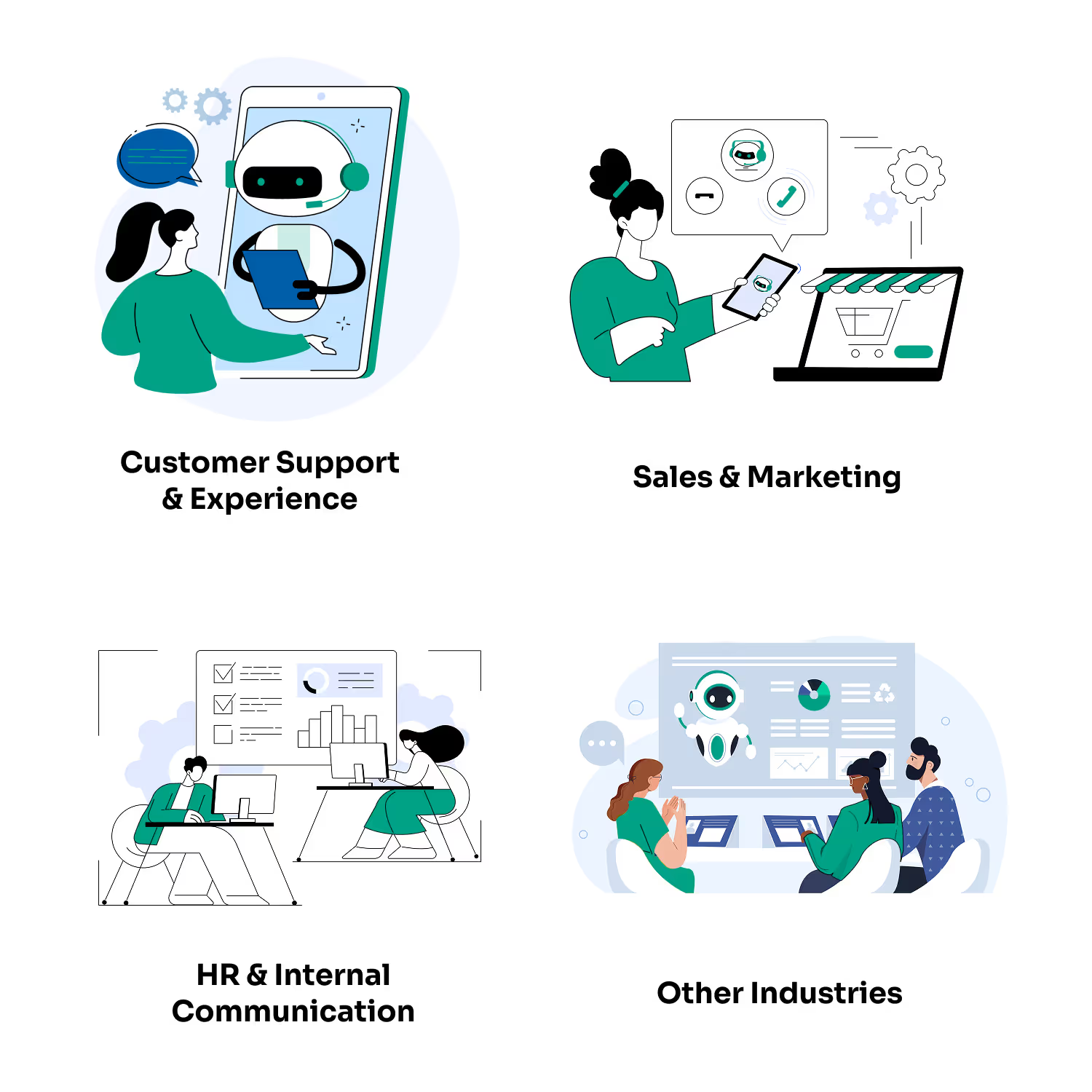
Marketing and personalization
Conversational intelligence is also making waves in marketing. AI chat agents on websites or social media can personalize product recommendations by analyzing what customers have browsed or purchased in previous sessions or visits. They can upsell or cross-sell with a conversational touch (“I see you bought a laptop - do you need a case for it?”).
Furthermore, conversational intelligence can be used for interactive marketing campaigns. For example, a beauty brand might have an AI chatbot that quizzes users and gives personalized skincare advice, creating an engaging experience that also drives product discovery.
These intelligent conversation software solutions blur the line between service and marketing, providing value to the customer while steering them through the marketing funnel.
Beyond marketing, AI-powered agents built on conversational intelligence are also transforming how enterprises approach market research and insights - especially in market research.
We expect to see more and more companies adopting this tech and conversational intelligence becoming a staple in the business communication trends of 2025 and beyond.
Internal communications and HR
Aside from using AI agents for hiring, enterprises are also applying conversational intelligence internally. HR chatbots (a type of conversational AI agent) can answer employees’ questions about benefits, company policy, or IT issues on Slack or other internal channels.
This improves employee experience by giving instant answers and freeing HR staff from repetitive queries. Meeting assistants (like Zoom’s AI assistant or Microsoft Teams’ Copilot) can live-transcribe meetings, highlight action items, and draft follow-up emails.
These AI meeting notes and insights mean employees don’t have to worry about scribbling notes and can focus on the discussion. The AI ensures nothing is lost, and everyone gets a summary after the meeting.
Different industries are customizing conversational intelligence to their needs.
There are countless benefits in adopting this tech, especially for enterprises. In healthcare, AI chatbots handle patient triage (“symptom checkers”) or help schedule appointments, improving accessibility.
Reports show that 58% of telemedicine platforms now use conversational interfaces to facilitate doctor-patient interactions. In finance, AI assistants help with account information and advise on basic financial questions.
In education, AI tutors or campus chatbots guide students. These specialized agents show that conversational intelligence isn’t one-size-fits-all – it can be trained on domain-specific knowledge (medical terms, financial regulations, etc.) to become an expert virtual assistant.
The trend points to more conversational intelligence platforms tailored for specific sectors (e.g., legal AI assistants, real-estate AI chatbots, etc.), which will further drive adoption because they can be deployed faster with industry context built in.
Can you think of a department in your company that could benefit from adopting conversational intelligence? If so, contact us!
Subscribe to The InterspectAI Blog